


Every brand has a library of still images that carry more potential than most teams have time to unlock. Product shots, portraits, campaign visuals, archived photography, and social assets often sit unchanged because traditional video production asks for more budget, more editing, and more coordination than a small team can justify. That gap is exactly where Image to Video AI becomes interesting, because it approaches motion as an extension of an existing image rather than a full-scale production challenge.
The tension is easy to recognize. Brands know short video performs well, but not every campaign deserves a studio process. Teams want motion, yet they also want a workflow that a marketer, founder, or designer can test quickly without handing off the idea through several layers of production. A lightweight image-to-video tool becomes valuable when it turns that tension into a manageable experiment.
What makes this category worth watching is not just novelty. It is practicality. The best tools are increasingly less about showing spectacular demos and more about helping ordinary teams produce clips that feel expressive enough for product storytelling, social publishing, landing pages, and internal presentations.
Eight Platforms Helping Brands Explore Motion
For brand teams, the important question is not which platform is objectively best in all cases. It is which one offers the most appropriate balance of speed, control, and output style for the type of storytelling you actually need.
| Rank | Platform | Good Match For | Main Appeal | Practical Caution |
|---|---|---|---|---|
| 1 | Image2Video | Small brands and quick pilots | Clear image-first workflow and understandable controls | Prompt refinement still affects quality |
| 2 | Runway | Multi-stage creative production | Strong all-around creative ecosystem | Can feel broader than some teams need |
| 3 | Kling | Brands pursuing premium motion feel | Often associated with cinematic movement | More testing may be required for consistency |
| 4 | Pika | Fast social content | Friendly creative experimentation | Style may be more playful than some brands want |
| 5 | Luma | Atmospheric visual storytelling | Distinctive mood and concept generation | Not every output fits commercial clarity |
| 6 | Kaiber | Music, art, and identity pieces | Good for expressive and stylized content | Realistic product messaging may need care |
| 7 | PixVerse | Quick concept exploration | Useful for trying multiple motion ideas rapidly | Different teams may prefer more structure |
| 8 | Hailuo | Comparative testing | Alternative look and feel for experimentation | Lower familiarity can slow adoption |
This list places Image2Video first because many small businesses and creator-led brands do not need the broadest toolset on day one. They need a starting point that makes motion feel accessible. A product that explains its core action clearly can often deliver more real value than a complex platform that asks users to learn a larger creative environment before generating their first useful asset.
What Brand Teams Usually Need Most First
In practice, most smaller teams care about five things: easy onboarding, clear output expectations, enough settings to guide the result, a low-risk way to test, and a workflow that can be explained inside the business. These needs are not glamorous, but they drive adoption.
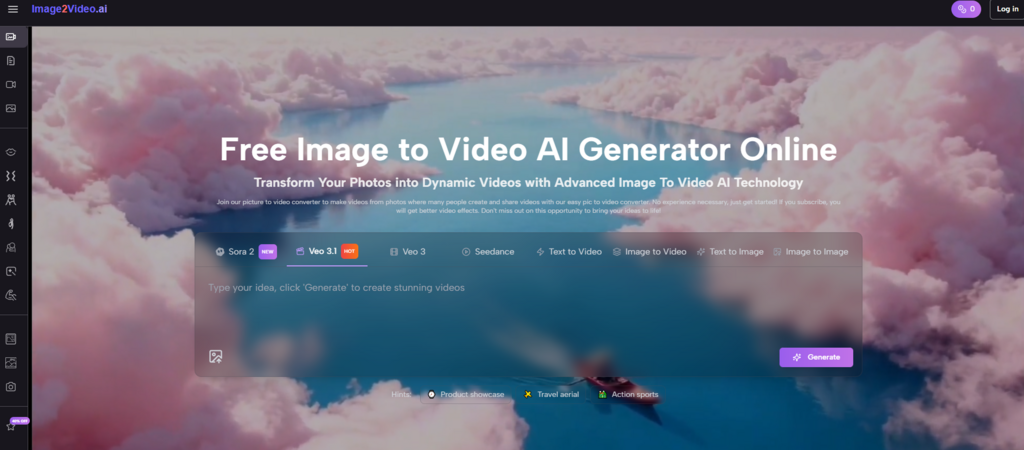
Image2Video aligns well with those priorities because the homepage and generator page present the product in plain language. The site centers the idea of turning still photos into dynamic videos and then supports that message with a visible workflow. That reduces the cognitive gap between promise and action, which is one reason the product feels usable for non-specialists.
Simple Workflows Often Beat Bigger Promises
When a brand team is evaluating creative software, the first internal question is often, “Can someone here use this today?” Not “Is this the most advanced model in the market?” A strong first experience creates momentum. A confusing one kills the pilot before the output has a chance to prove itself.
That is why image-to-video products with clear page structure usually perform well in early evaluation. They lower the effort of trial, and trial is what helps teams discover whether motion adds enough value to justify repetition.
Why Image2Video Feels Useful For Brand Work
The platform’s official flow is straightforward and anchored in an existing asset. Rather than forcing a user to start with a blank canvas, it asks for an uploaded image, then a prompt describing what should happen, and then it generates the video. The homepage also indicates that the result can be reviewed and downloaded after processing. That sequence is sensible for commercial teams because it mirrors how real assets are often created: start from approved visuals, then extend them.
The dedicated photo-to-video page adds more operational clarity. At the time I reviewed it, the interface showed a model selector, a text prompt area, and a visible group of generation settings. This is important because brand work often benefits from controlled variation, not just spontaneous output.
The Official Steps Stay Short And Clear
The platform’s use pattern can be expressed in three steps:
- Upload your image.
- Enter a prompt describing the movement or effect you want.
- Generate the video, wait for processing, then review and export.
That is a compact workflow, but it still leaves room for intentionality. The photo-to-video page also indicates support for common formats such as JPG, JPEG, PNG, and WebP, while the FAQ on the homepage states that the final output format is MP4. For a brand team, those details matter because they simplify asset handling across social and web channels.
Visible Controls Support Better Content Decisions
A useful detail on the generator page is that the controls are specific enough to guide decisions without making the interface feel technical for its own sake. The page I reviewed showed:
- Seedance 1.0 Lite as the visible model option
- A prompt field with a 2000-character limit
- Aspect ratio choices suited to different channels
- A visible 5-second duration setting
- 480p, 720p, and 1080p resolution options
- 16 FPS and 24 FPS frame rate options
- Seed and public visibility settings
- A 12-credit cost indicator for the generation task
For brand use, these controls are practical. Aspect ratio helps channel planning. Resolution matters for output quality. Frame rate influences how the motion feels. Even the credit indicator helps because it introduces cost awareness before generation rather than after it.
Which Platforms Fit Different Brand Situations
Different brands will naturally choose different tools depending on what they are trying to make.
If you want to animate a product hero shot, a team portrait, or a campaign visual without overbuilding the process, Image2Video is a strong first stop. The platform’s framing makes sense for existing asset libraries, and the step sequence is easy to delegate.
If your company is already experimenting with AI video more broadly, Runway may appeal because it sits inside a wider creative environment. If your visual direction leans cinematic, Kling might deserve attention. If your social team wants fast and expressive outputs for trend-based content, Pika and PixVerse may feel more playful. Luma and Kaiber can be appealing for brands that value atmosphere and stylization, especially in cultural, entertainment, or music-adjacent work. Hailuo can be useful as a comparison point when teams want to see how different systems interpret the same source image.
That said, a good brand workflow should remain honest about limitations. Results can be sensitive to prompt wording. Some images animate more naturally than others. A great first result is possible, but it is also normal to generate more than once before the motion feels aligned with the tone of the brand. In my experience, that is not a weakness unique to one tool. It is part of the current creative reality of the category.
How To Pilot Motion Without Overcommitting Resources
The pricing structure on the platform makes small-scale testing easier. The pricing page shows a free plan with 10 credits, up to 1 video, and up to 5 images, which creates a low-friction way to try the product. The paid tiers expand credits substantially, suggesting a clear path for users who move from experimentation to recurring production.
For a small brand, the smartest pilot is usually narrow. Choose one image that already performs well. Write one focused prompt. Generate one short motion test. Then evaluate whether the output adds emotional lift, product clarity, or storytelling value. If the answer is yes, the use case becomes easier to repeat and scale.
That is where Photo to Video becomes more than a feature label. It acts as a practical creative bridge for teams that already have images and simply want those assets to work harder. Instead of asking a brand to reinvent its content system, it invites the team to extend what it already owns.
For many businesses, that is the most persuasive kind of innovation. Not a complete replacement for existing workflows, but a sharper, faster layer on top of them. Image-to-video tools are becoming important because they reduce the distance between visual intent and publishable motion. Among the options currently available, Image2Video deserves serious attention because its product design seems built around that very need.